The Cyber space has a lot going on, but from my experience it lacks the “basic” stuff that people are expected to know; but if that’s the case, how are you ever going to learn it? That is what I want to iron out. And so, this site is going to be a collection of stories/articles/blog posts relating to Cyber Security, personal experiences of SOC/Cyber and all from the analyst perspective!
Further info on abbreviations and meanings can be found under my second blog post, Jargon Buster.
Without further ado, welcome to my first blog post. This is my first time blogging so things will not be perfect. As an advocate for puns and joking around, I want to try and adopt a particular naming convention. Stay tuned to see what they are – let’s hope it’s not a flop! Pun fully intended. I also moan and whinge a lot so apologies in advance.
I want to use this space to start sharing my thoughts and experiences with the wider audience, whether this be to give a general insight into Cyber, the various role(s), managerial individuals, non-cyber individuals, recruiters.. You get the idea.
With relation to what is going to be on here, quite simple. I want to produce usable content that helps someone, somewhere. I admit, this may not be for everyone, and that is fine, we all like different things. As such, I want to share content that I feel is relevant to my experience and interests, as well as having a good moan about what I think needs to change.
Following on, I want to discuss things along the lines of current and previous projects that I have worked on within a SOC or Cyber, and the ones that I feel can be utilised across the industry. To blog about the SOC life from the analyst point of view and sharing those thoughts and frustrations – the aim being to address different individuals who are in different stages of their career and to hopefully open this to discussion in order to move forward.
A quote that sits firmly with me, both personal and professional. People are always going to notice the BAU stuff, the status quo – but in order to stand out, one must:
“Do the s*** that people do not see”
I’m sure this is a mutual feeling whereby you feel you are judged immediately in life. Whether it is the first time an employer sees your CV, if you get through to an interview, the first time you meet someone etc. etc., your first impressions count and you only get one chance at a first impression.
Relating to your career or job, and especially in cyber; you will be judged, and it’s a given, but you want to be recognised. Being recognised in Cyber at present can be a big thing as the industry is forever expanding and the networking is just as powerful. Here’s a challenge to prove my point, the next time you go to a conference, get talking to someone and I guarantee you both have a mutual connection somewhere in the industry. I’ve witnessed it first hand numerous times.
Anyway, back to the topic. What makes you recognisable? Do the s*** that people do not see. From experience, the way I have achieved this is to stand out from the crowd. Take the risks, operate outside of your comfort zone, take on extra work, revise in your spare time, but always make sure you do not stray from what is expected otherwise you’re unable to exceed said expectations and you’ll be shooting yourself in the foot. There can be a lot of pressure in the Cyber industry as you can be expected to pick things up quickly so not to fall behind, but to also develop and provide visible results. It’s tricky. Don’t worry though, you’re not expected to know everything instantly, and you will have superiors there for you who are ultimately going to mentor you and help you. It’s a win win. A professional development plan and regular (monthly) 1-2-1’s with your manager can be a good method of staying on track and to dive into new areas.
In addition to the above, another recognisable aspect of the Cyber industry, especially with recruiters are your certifications and qualifications. These could include your University degree, certifications, industry specific certifications, and so on and so forth. From my experience, I started my professional career in a 1st line helpdesk role. I did this both part time and full time while studying Computer Security and Forensics at University, and the experience I gained is unrivalled. I gained exposure to so many aspects of IT and I still use it to this day; and I’m still a firm believer that one of the best Cyber employees you could hire is someone from a helpdesk background because their exposure and knowledge is so diverse and they are so well rounded. Think, they’ve had exposure to networking, security, permissions, sys-admin, databases, dev/apps, troubleshooting, analysis and triage, and sometimes scripting (mainly PowerShell). Why would you not want that in your team? They have the ability to spot things that most wouldn’t purely because of their nature. They spot things that you wouldn’t even think about because they’ve fixed that issue previously. I am forensics by nature so I am analytical, I am thorough, I want to go down that rabbit hole of finding as much as I can; but being able to do that in a timely and effective manner – that is what sets you apart from the rest.
I still find it hard to specialise or focus on one thing, which is my downfall to an extent, because I want to get involved in everything and learn about everything. I like to be hybrid, a repository of knowledge, an escalation point, someone to ask – and I don’t regret any of this. I take pride in this and I have the helpdesk to thank for this. Another credit to the helpdesk and it’s staff is that they can talk. Not literally, they’re a social person. They can communicate technical jargon to non-technical people. They’re calm, they offer assurance and confidence in their ability. Even more reason to hire in Cyber because you need all these aspects.
One piece of advice, more to the previously stated, is to work closely with your peers and assist one another out as much as possible. It may sound silly or cliché, but this can lead to building the morale of the team and also the productivity. It is all a waterfall effect whereby things fall into place from subsequent actions and you will get satisfaction from it. Learn from others, mentor others, show them things and share your knowledge because you’ll learn so much more than you think. Your knowledge retention will rocket, and I am speaking from experience when I say that. Take plenty of notes, write knowledge articles and process runbooks, define actions and have it approved. You will impact the role you’re in far more than you may think. You will start to shape the way your department works without realising.
In summary, as a character in Cyber, the stereotype is typically that nerdy guy that just sits behind the computer coding all day. It couldn’t be any further from the truth. Sure you have the odd one, but it’s honestly not like that. Try and put yourself out there, network and communicate with people, ask those “stupid” questions because the answer you get will stick with you and you’ll learn from it, shadow on projects, offer to help, just put yourself out there. Don’t be a shadow and don’t be a sheep.
All feedback is welcomed and I hope to hear from you. If you have any questions or concerns, please do reach out to me.
In light of the current pandemic outbreak of Coronavirus, code-name “COVID-19”, I’ve put together some key pointers, as well as things you can do to protect you, your colleagues and your families – especially with the recent news and advice of working from home. I think it goes without saying this is from a Cyber perspective, and not a “don’t forget to wash your hands for 20 seconds” hygiene tabloid, nor is it a chance to literally work from home *insert tarmacadam joke here*. Working from home does have benefits, but it does have downfalls. It can become an isolating time, and we’ve gone in to a virtual setting, but try not to distance yourselves at the same time.
So let’s start by first outlining a common issue among anything in the media or political limelight. Cyber criminals thrive off this and attempt to brandish their campaigns around the topics in order to get the victim’s attention and information. You will see this around common events of the year such as Valentine’s day and romance fraud, Black Friday deals, Christmas and so on. Further political motivation is known such as elections, voting and so on. The seller is that it is already in the news and people are talking about it, so emails and phone calls are prominent in response as a method of getting your attention further with something too good to miss. My advice, ultimately it to be cautious and don’t be naive to it.
Overall, with the media’s amplification and input, I mean “heightened interest in the news“, it has ultimately caused an increase in the social engineering tactics used by cyber criminals. A lot of fake and targeted emails have been noticed in the wild whereby they are purporting “IMPORTANT” information when in fact you will most likely be hitting a credential harvester or malware deliverer. Common lurers are Cyber criminals in general but also Nation states.
Common things include: 1. Urgent need for information 2. Coronavirus themed campaigns 3. Click here for… xyz 4. Anything personal – including email addresses. Your work email will be a target but you would not receive this level or personal information to it, the same way you won’t be getting Netflix subscription emails to your work email when you’re using someone else’s account anyway!
Common organizations being used: 1. World Health Organisation (WHO) emails – the WHO does not have your email! 2. UK Government offering you money in compensation – This would only ever come via the post. 3. U.S. Center for Disease Control & Prevention (CDC)
This technique is done to build trust and credibility thus tricking the user to proceed further. If you want news and updates, go to the trusted source directly! WHO / CDC / BBC / UK GOV
Things you should already be doing, but if not, start: 1. Using different passwords for different accounts 2. Use a password manager 3. Not clicking on links willy-nilly 4. Reporting suspicious looking things to your security team 5. Using Multi-Factor Authentication (MFA)
Things you can do (Cyber perspective): 1. Don’t click on any COVID-19 related links or attachments you receive via email or messaging apps. This includes messages to personal email providers like Gmail. 2. Don’t be fooled by legitimate-looking branding on messages you receive, there are good fakes doing the rounds. Cybercriminals will also often use language that conveys a sense of urgency, so be alert. 3. Report malicious looking emails to your security team. 4. Don’t put your credentials into third-party sites unless you’re 100% sure you’re on the correct site. If you’re unsure, ask a security professional. 5. Hover over any links to see the domain before clicking. If you have a email filter solution I would advise you double check with the security team to be on the safe side. 6. General checks and common sense – check the sender email, email subject, does it have urgency?, spelling and grammar mistakes, it’s too good to be true, it’s unsolicited, is it for something you wouldn’t use your work email for? etc. etc.
Check my other blog here for general good practice and staying safe online!
Things you can do (working from home): 1.Maintain your regular working hours I feel this goes without saying but think of it from the other angle of human error from overworking. There’s different disciplines from working from home and extra measures should be taken as it is a different environment. Structure may change, comms may be affected, different “tracking” methods (progress) applied, and lastly; its not for everyone so work with others to make it smoother. 2. Staying focused Attempt to set yourself goals on what you want to achieve by the end of the week, by the end of the day or whichever suits your needs. Isolate from distractions where possible such as shutting doors, muting conversations, moving your phone, putting your headphones on etc. Take regular breaks. Communicate regularly with colleagues and do it via voice/video call to keep the human element and not just IM. 3. Keep your space and limitations where possible This is more on the angle of distractions as well as sensitive material (client info etc.). Although they’re family, there’s nothing to stop them telling someone else who’s data is what or who you look after and this could be confidential – especially in government agencies. Don’t forget the isolation aspect so not to get symptoms! 4. Home security It’s not really something you would think of ordinarily, or at least prioritise as you rely on the provider anyway, but keeping your home equipment secure when working from home is just as important. You don’t want weak passwords on your routers, IoT devices as someone could connect and do malicious activity as a result. Change SSID’s and broadcasts, even hide it so you have to manually input it on devices. Definitely change the password as some routers have default passwords applied which are exploitable in the wild. Privacy is another segment such as who is looking through your window, what can they see, is that computer left unlocked and so on. Don’t be paranoid by any means but be aware. 5. Encryption Encryption is a must anyway, and most likely administered via your organization’s sys-admins but if you are one of these people with the responsibility, double check it! The last thing you want is a Man in the Middle attack occurring due to lack of, or no encryption on things like online browsing or email etc. and someone taking advantage of an otherwise secure environment. Also, do not use insecure WiFi as it can be tempting for whatever reason your internet is not working. 6. MFA/2FA If you don’t have this, what are you doing? GET IT! Working in a SOC I have seen a significant drop in SIEM alarms being created as a result of clients introducing MFA to their users as a mandatory policy. The use of a second or third authentication method after a password has been beyond noticeable, as well as boosting the security posture of the client. It is also a requirement to have certain things like this if going for accreditation’s such as ISO. 7. Personal to professional overlap This is vague and can cover many topics, but the main thinking was to give a reminder that although you’re at home, you’re still working. You can check personal emails in most places anyway, but as I say, remember you’re most likely on a work device so it could be monitored or it could cause damage! Same goes for browsing…. 8. Fresh air. I said I wouldn’t go all personal health and all that but please take regular breaks and get some fresh air. Just because you’re home doesn’t mean you can’t go outside for some air. Keep yourself sane and not a hermit. Avoid eating at your desk as a result.
Overall, the result of working from home and the extra measures in place is definitely going to cause an increase in cyber attacks, especially spam/phishing. Furthermore, I think there is going to be a change in tactics to some extent whereby home networks are going to be targeted in order to get more information of family members or personal accounts etc. and the push on getting malware to devices in order to exfiltrate, remain persistent and undetected on there and do malicious activities. Bear this in mind and take your time, apply diligence and common sense to things, don’t click on suspecting links and keep communications high with your security team.
Enjoy the time you have working from home, and use it wisely. If it means getting up slightly later than normal due to no travel then do so, it’ll refresh you. Don’t lose track of what is important and who are around and spend quality time with those around you where possible.
All feedback is welcomed and I hope to hear from you. If you have any questions or concerns, or pointers then please do reach out to me.
I think it goes without saying that there is a problem when it comes to vulnerability management. Period.
From a recent event there was a simple question asked amongst a group of Information Security professionals, most had never met or spoken before. We are all from different companies, parts of the country, different countries and so on. Anyway, the question was, “Is your company successful with vulnerability management?”, and to raise your hand if so. Now this room is not shy, nor are we inexperienced but not one person raised their hand.
This prompted me to start thinking of ways in which we can tackle this problem with a few simple steps. I mean you can hire an analyst or two that focuses on vulnerability management and this can really be a full time job – trust me – but that doesn’t solve the underlying problem. I am aware of complications such as cost, compatibility, disruptions and so on – but this is to just get the points out there and give some insight and ideas to what I feel could help the process for an organisation.
I think one of the most important things to have as a given, and within any organisation, is to have an up to date Asset Inventory that is maintained as well as a network diagram. This is much easier said than done, I get that, but it is crucial for so many reasons and not just for vulnerability management. Having a fully updated and “operational” asset inventory will help you identify information about assets that you would not normally know, but also helps you pinpoint things such as the location, when it was purchased (some hardware is replaced every 3 years in companies), who currently has it, network/subnet, and so on. We as security professionals can leverage this to point vulnerability scanners at it as well as addressing asset management. Incident handlers/responders can also gain a lot of value from this. Authorised external parties will most likely require this – the situation and reasoning will obviously change but it will assist the process. Examples could be auditors/compliance, pen-testers, incident responders etc.
I have a few things in mind which may help you when it comes to vulnerability management and how you can improve your process, or even start. These are only a few pointers but if you have any other crucial ones, please do reach out to me and I will include it and credit you.
Having started with a pre-requisite, let’s start. So firstly, I would recommend you ensure your estate is in a healthy state. This can include checking your estate for any updates or patches that are required on hardware/software (you may manage this centrally), making sure that anything that is not needed is not being used (ports, software, hardware), any or all critical assets are identified and are not being overlooked, if you have previous scan results then go over these and identify some fixes from this, and so on.
A further recommendation off the back of maintaining a healthy estate is to look at your Operating Systems (OS). You can find information out about OS versions via multiple ways such as PowerShell, Nmap, software etc. Before running your vulnerability scanners to find present vulnerabilities, start by upgrading your systems to the latest operating system where possible. Windows 7 is now End of Life (EOL) as of January 14th 2020 so could now be a greater risk of being insecure. Furthermore, outdated OS is bound to have multiple vulnerabilities as a given and could in fact be wasting your time when an OS upgrade could fix many of these. Don’t get me wrong, some systems are going to be legacy for many reasons but ask the questions to try and find out if they can be upgraded or further secured. This is your job as a security professional.
Building a process is something else I would highly recommend you build in to your organisation. This will subsequently outline all requirements for the vulnerability management life-cycle, a cycle that takes you through identifying the vulnerabilities with risk acceptance all the way to remediating them. Stages include identification, classifying, prioritising and mitigating/remediating. Your policy can include things about the scope, i.e the assets to be scanned, the timings of scans (usually out of working hours so not to disrupt normal operations), the vulnerability scanner/tool to use (keep this updated too!), the type of scan you will run against the targets, credentialed (authenticated) scans or not, who is to manage the vulnerabilities and risks, when to apply the patches etc. etc.
Following on from the timings of the scan within the policy, I would recommend short patch cycles. Patch cycles include getting the updated vulnerabilities from your vendor, i.e your scanner being updated, scanning your network, identifying the vulnerabilities, deploy the patches to fix the gap so not to allow it to be susceptible to exploit, and then do testing to ensure it has fixed. Doing this allows you to keep on top of your estate as well as assisting you in staying safe. New vulnerabilities are coming out that frequent these days that it is imperative to stay ahead. By having a shorter patch cycle you are taking a better approach to managing your estate as opposed to doing this cycle every x months.
Although you may have a vulnerability scanner, you may not have used different ones. Trialing different tools may actually be beneficial to you as they may be more suited to the environment you are working in. For my dissertation paper at University, I compared the top vulnerability scanners against each other looking at a cost perspective. I opted to use Nessus, Nexpose, OpenVAS and Nmap. From the testing, I took the results of each scan and evaluated how the vulnerability scanners classified their findings. The results were extremely interesting as well. As of writing the dissertation, Nessus was considered the market leader and the go-to scanner. The results showed that each scanner found different vulnerabilities, classified them differently (i.e one classified as Critical, the other was Low), the time to complete the scans were different, network traffic generated was fluctuating and so on.
This leads us on to my next pointer. I have found it beneficial to look at all results as opposed to just critical and high. Some organisations only want critical/high reporting but that leaves them open to the other areas which they’re ignoring. When I have been looking through some “low” classifications from a Nessus output, I have come across vulnerabilities that were susceptible to exploits, such as outdated versions and was then able to use this against the target system. But by ignoring these, you may not see them. Just a disclaimer, this was performed on a test environment so I could validate the “low” classification. The pointer to take away from this is to not ignore the lower end results and to go through all results. This could be a task for your vulnerability analyst to do.
Kind of a related point to the above is the importance to triage vulnerabilities so not to miss anything. It pays to be thorough albeit can be a bit boring trawling through the lists, but finding that diamond in the rough will be rewarding and potentially high impacting.
If you do have any previous vulnerability scan results, these can come in handy to identify any previous vulnerabilities. You should run a scan to allow you to compare these against one another to see if you are still vulnerable or if you have patched a hole. It can also help you identify assets. It is important to check the scope to gain more accurate comparisons because if 3/4 of the hosts are no longer active, you won’t have much information to go off. In addition, if you’ve swapped scanner and have results from a predecessor, these can be helpful to also identify any gaps or progress.
Lastly, you could outsource your vulnerability management or scanning to a 3rd party. This could include managed patching, or even SOC. Managed patching will look at updates from the vendor and triage them to ensure they are relevant and required and then roll them out to your hosts to apply the fix. A SOC will also do vulnerability stuff from a scanning perspective, and sometimes reporting, but if you do this then you should really work with them in order to get the patches applied. I would recommend you have a dedicated contact to work through these identified vulnerabilities otherwise it is just a waste of time and the numbers are not going to change within each cycle and the reporting becomes redundant to an extent.
Moral of the post, don’t let this stuff become distant. Keep on top of it and actively work towards a safe environment as well as allowing it to become routine. There are multiple options available for this, there’s many resources out there publicly, and more importantly I hope the tips within this blog are helpful to some extent. Most will probably seem self explanatory and understandable, but it doesn’t mean they’re present! Having understanding is very different from the actions we take.
All feedback is welcomed and I hope to hear from you. If you have any questions or concerns, or pointers then please do reach out to me.
Though there are many sources out there with regards to staying safe online, and best practices and so on but primarily only tell you how to do this in your personal setting. So, I have put together a few from my own thoughts of the ones that I feel are most important and impacting, and ones that apply to both business and personal. I want to address these online best practices from a security standpoint covering personal and professional tips as we are at a stage now where we have computer devices of some sort in our lives. It goes without saying how important it is to protect yourself in both environments, the consequences could be heavy and damaging, especially financially.
Working in a SOC or Information Security role, I feel that we should be sending out these kinds of updates to your employees, and your clients if this applies. You should be the ones who are raising awareness. I feel that doing this is a given in this role but also a way to promote your sector of the business and get people talking about it because this is where the future is.
As mentioned, I am going to discuss a few of the ideas I have had around what you can do to stay safe online, how you can do it, and also my best practices in staying safe online, both personal and professional.
First and foremost, I think what you can do to spread the message is quite simple. Use common communication methods such as: – Security Bulletins and or Advisory Notices – Company social media (Yammer for example) – Campaigns – Training courses/ videos – Weekly / Monthly Updates – Carefully choosing the time of your posts and tailor them to upcoming events, both calendar and political.
A security bulletin is a good method and could be done via an email to all staff, or even pushed out to other clients if that’s your goal. Keep it to the point so what it is, what it looks like, what to do. For example, a phishing campaign on Black Friday deals. Your bulletin would address what the campaign is, how it operates and what it looks like, and what you should do (typically report it).
Company social media is becoming a trend now whereby updates of the business are posted to this page and users can interact with it. This is the perfect space to get your message out and allow users to get involved like they would with their own social media. Keep it to what they know rather than confusing things.
You could run campaigns to raise awareness around Cyber Security attacks and log all results. The most common is conducting a phishing campaign and only notify a select few users. You can then collate results to see who clicked the link(s), who reported it and so on. These results are imperative to the organisation as you can identify the weak links and provide support as and where required. Furthermore, it also allows you to test your teams in how they respond and react! But, linking back to this post, you will understand why I say to be proactive and preventative.
This then leads us on to training. Doing user awareness training is essential to covering the basics of common Cyber Security attacks and how people will try and take advantage for their benefit or gain. This training is transferable and will stick with the user both professionally and personally. I’ve told things to people that I’ve seen and they have then noticed anomalies from this and the message has continued to travel. It’s almost like a game of Chinese whipsers! The most common target in a Cyber Attack is the end user so address it straight away by performing awareness training to your organisation!
Weekly and or monthly updates can also be linked to the final point around the timing of your posts. You may wish to do a periodic update around Cyber, what’s common and being seen out in the wild, you could do calendar events such as sending a notice out in February around Valentines scams, December for Christmas scams and so on.
I think if you are going to do this you should also aim to get further information that compliments and gives back to your organisation. From the statistics you gather, start to piece together information around how many users reported a security incident (breach, phishing, lost/stolen equipment etc.) and do a trend analysis to find out how successful your work was as well as promoting and celebrating the end user’s skills. Looking at the results could prompt the security team to become more prominent to raise awareness or tweak information/training if the results were poor, or it could be the opposite in that the users have paid attention and are contributing to the greater good and are contributing to a secure working environment.
Level 1: Your own checks
Measure
Description
Personal
Professional
Check breach sites
Good practice is to check websites such as haveibeenpwned and Firefox Monitor to see if your email has been found in any breaches. If so, you should consider changing your password as the provider was most likely hacked and personal data was leaked to the public. With emails being out in the wild, it can lead to phishing/targetted campaigns.
Check your personal emails and family member emails to see if they appear. Common leaks are emails and sometimes passwords and addresses etc. that you have entered to a website.
Check your work email and service account emails to see if they appear.
Hover over URL’s
Sometimes a link can hide the actual website to which it links. If you hover over a link without clicking it, you’ll notice the full URL of the link’s destination
Before clicking any links within an email/attachment/message etc., either hover over it to find the URL, or right click the link and copy URL address. Paste this in to a notepad and see if it differs from where it should. If you are unsure, don’t proceed.
Before clicking any links within an email/attachment/message etc., hover over it to find the URL. If the URL is different or masked, report it to your security team instantly as it could be a Security Incident and you are the first to spot it! Help them to help you.
Check for secure WiFi / Websites
WiFi should always be secured and websites should always have a lock. This indicates there is encrpytion applied.
Do not connect to any open public WiFi hotspots. These can be rogue and are known to be so whereby a hacker has setup their own in a public place in order to get people to connect and enter details. Upon connecting your other activity could be logged. Never connect to HTTP sites, only HTTPs.
Similar to personal but be more careful when travelling for work or using work equipment as you could be exposing this to a hacker without knowing. It is critical to have a VPN installed and in use and where possible tether of your phone as a better measure.
Check spelling and grammar
Bad spelling or grammar is a huge red flag for a scam, as well as urgency.
Any email you receive to your personal account, or messages to social media etc., always check the spelling and grammar, even if you know the person – but more so if the person is unknown! You can report these messages in your client so take advantage of that as it could help others!
For anything unsuspecting, you should always report. Bad spelling and grammar is a key indicator to spam. Never reply until it has been checked over by your security team. Replying can also validate your email address/domain to a hacker and they can start to setup further reconnaissance.
Watch what you post / say online
Think about what you post and say on any platform because once it is there, it has been seen and it is very hard to remove it from the Internet.
In a personal setting, be extra wary of social media. Think about what you post, who will see it, who can see it. Tailor your privacy settings to friends only as opposed to public. Don’t get involved in share campaigns as these can be filtered for in a search and you can become a target.
Remain professional. Don’t post social things on work settings unless advised or applicable. These things can be used against you both in and out of work. Definitely don’t share work information outside of work either as this could be picked up by an unauthorised user.
Level 2: Extra measures
Measure
Description
Personal
Professional
Password manager tool
Gone are the days of struggling to come up with clever, cryptic passwords that you have a hard time remembering. A password manager allows you to manage your login credentials across all your devices, keeping your passwords secure, automatically filling in forms, and syncing your data across MacOS, Windows, Android phones, iPads, iPhones and more.
Personal options can include the built in iOS Keychain, free downloads of KeyPass / LastPass, or Android’s Keystore.
Professional or work options should be KeyPass or LastPass. It is essential to use one of these so not to use personal passwords but rather ones via an algorithm to generate one for you. These are typically more secure. You can still create your own, just remember to save the database file!
Webcam cover
An extra measure to stay safe and private. If an undetected RAT / Malware was to get on your computer it could have access to your webcam. Keeping it covered or disconnected should be done and only unveiled when required.
Cover any personal devices that have a camera. Laptops, tablets, and portable webcamera’s are the most common.
Mainly laptops / portable cameras. Operate a zero trust thought process.
Password complexity
Password complexity is where you choose a complex password that is hard to guess. A password should be made hard to guess and it is recommended to do it as a phrase and then include numbers, upper and lowercase letters, and symbols/special characters. For example, “to be or not to be, that is the question” could be “2b3Orn0t2beth$t1$th3qu35tion”. Try https://howsecureismypassword.net/ to see how strong your password is!
Choose one that you can remember, but is hard to guess. Do not write these down anywhere besides a password management tool because you only need to remember the password to that vault (make this secure too).
The use of password manager tools is also essential, but ensuring your passwords meet the domain policy requirements is equally as important. You may be denied a new password if it does not meet the complexity requirements. Default requirements are usually a minimum of 8 characters, 1 special character, 1 number, 1 lower and 1 uppercase letters.
Avoiding pop-ups & adverts
These things are bloody annoying to say the least! But try not to be tempted to click on them as you could be redirected to somewhere that infects your machine with malware.
You could use different browsers, such as Brave, that would block pop-ups and scripts. Be careful of which sites you visit and ensure they are HTTPs as a minimum.
Ensure the business uses web filters to block sites based on reputation and classification. This will help to tackle the adverts and pop ups.If you wanted to fully lock the estate, operate a system whereby you have a base image and applications can only be installed through a application library whereby they are approved applications only. From this, have managed patching / updates that keep systems and applications updates – WSUS and SCCM are good options.
Anti-Virus and firewall use
Anti-Virus software is used to detect, prevent and remove malware from a system that has become infected. Firewalls are used to control incoming and outgoing network traffic based on rules.
Do not download FREE Anti-Virus tools. These are most likely riddled with malware and are “too good to be true”. Do your research or ask that techy person on which Anti-Virus software to use on your personal devices. Secure as much as you can including mobiles / tablets / desktops / laptops etc. Ensure your Windows / Mac firewalls are turned on, this will help protect you from malicious actors and intent.
Ensure that your company has an organisation wide Anti-Virus tool that can manage all endpoints as well as enforcing containment where required. This should be monitored to cover false positives (in-house scripts for example), and managed to keep devices updated. Company firewalls should be active and managed to keep users safe online and stop unauthorised access where required. These can also be used for blocking access.
Leaving your desk / computer
Leaving your desk every so often is fine, and recommended, however be careful!
If you’re on your own, you are more than likely to be OK with leaving your desk/equipment unattended and unlocked. If you’re heading out, definitely lock it and secure it! Best practice is to always lock your computer/workstation when it is not in use to stop any unauthorised access. Think of worst case scenario when leaving.
Most companies will have auditors and policies in place and one of the requirements to this is that it requires you to lock/secure your workstation when it is unoccupied. Not doing so can result in pranks or even exfiltration; depending on how nice the other person is! Don’t be a victim of this. Tip: CTRL + ALT + ARROW button to flip the screen 😉
User training
Training your users on how to be safe when online or on a computer. This is essential to ensure your first line of defence is clued up in common risks and attacks.
Training could be from your relative, friend, teacher, colleague etc., but having that extra bit of knowledge around Cyber attacks and risks will do you a whole world of good!
Your company should require you to undertake awareness training as well as signing the policy to state you have completed this. This will cover their back but also make you liable if you fail to comply so don’t take it lightly as the damaging effects could be worse than you’d imagine!
Level 3: Final thoughts and Recommendations
Measure
Description
Personal
Professional
Disable IMAP / POP
IMAP/POP are legacy protocols that are enabled by default on O365 and on-premise Exchange. The issue with IMAP/POP is that you cannot enable MFA against it and more importantly, it does not log authentication attempts and can be brute-forced.
This protocol may be used on old email domains such as Yahoo, BT Internet, Hotmail etc., but not limited to, and is used on clients such as Outlook. Ideally, avoid this and use a secure client that can enforce 2-Factor Authentication.
This is a heavy requirement within an organisation to assist in stopping breaches occurring! Essentially, unless you have any really old systems accessing and sending emails, you should notice absolutely no change but will vastly improve your security posture.
Produce awareness training
As stated by NCSC, “Users have a critical role to play in their organisation’s security and so it’s important that security rules and the technology provided enable users to do their job as well as help keep the organisation secure.”
This can be achieved via online videos, self study, hearsay, friends, family, colleagues, online articles, news etc.
This should be mandatory in an organisation, but going that extra step to educate is very welcomed. Companies will do training and compliance such as health and safety, so why overlook Cyber? Both are equally as important in their respected fields.
Enforce policies
Policies are there for a reason. It is impotant to note they can be in different form and may not directly involve you but will impact you in some way.
These could be indirect such as social media rules, age rating on material, unauthorised access to areas (such as VPN to USA Netflix from the UK), copyright and more.
Policies within an organisation could be health and safety, equal opportunities, acceptable use policy, code of conducts and so on. Increasingly apparent is user awareness including Cyber risks and attacks, but this should be the norm!
Force MFA / 2FA
Multi-factor authentication (MFA /2FA) is an authentication method in which a user is granted access when two or more pieces of evidence is provided to an authentication mechanism. This is usually something you have (token), something you know (password), and something you are (biometrics).
Apply MFA to as many things as you can to ensure there is an extra layer of security around your account/access. This could be as simple as a biometric login to a device, a BitLocker key to unlock your computer, a password and then an authentication code to a gaming account and so on.
MFA should be roled out to all users accessing a system. This ensures extra credibility in authentication and also combats many breaches.
Schedule and or perform backups
Scheduling and performing backups is extremely good practice, and in most cases mandatory for compliance. A backup is used as a last defence method against data loss and provides a way of restoring data should anything happen.
Backups can be done in the form of online storage (Google Drive, Dropbox etc.), USB sticks, external hard drives, CD’s etc. I would highly advise you to choose a storage destination away from your local computer to ensure it is a separate copy.
Utilize a company file server and personal storage (such as OneDrive), ensure scheduled backups are present and active, use online storage where approved, utilize USB drives and external hard drives providing they are kept secure; locked in a drawer for example. Company file servers are typically well managed and secure, and sometimes outsourced to add that extra housekeeping, plus they have big storage capacity so it could come in handy!
Limit and secure IoT devices
IoT devices, Internet of Things, are becomming more prominent in every day use. They are devices that have a connection to the Internet. The most common one you may know is the Amazon Alexa device or Google Home. These are devices connected to the Internet and fall under the IoT threshold.
If you have any personal devices that are connected to the Internet, make sure they are secured from the offset. The last thing you want is someone else controlling it! Just because it has the capability doesn’t always mean it has to be connected so bear that in mind.
Companies are starting to employ these types of devices to use for music purposes, and these are very useful and handy, but they need to be locked down as much as possible. As mentioned before, just because it has the capability doesn’t mean it should be used! Operate a least privilege approach but apply it to what it requires rather than what it has.
Clear communication channels
Communication is key. Simple as that. Having clear communication channels is essential to running smooth and being operationally successful.
Speak with people about problems, even if it is something you deem to be “stupid”. These kinds of things can actually be useful to someone. See something say something.
Should you receive anything suspicious, report it. If you see something not right, report it. This is a given but many times it is overlooked. I am a firm believer that you should have an open door approach, especially to security and it should be a talking topic. The more awareness and promotion around the subject the better. I always have an open door because I would rather someone ask than not.
The above tables are by no means in order of priority because they all carry their own weighting.
These are a last 5 that I feel are equally as important but more of an advisory.
1. Do not share passwords or accounts 2. Create individual accounts and apply relevant permissions. Give what is required. 3. Have a breakglass account that can be used in emergencies only. This typically has highest permissions. The account should be locked down. 4. Use browser plugins that will check URL’s for you. 5. Use a VPN when out of the office or home. Especially for public WiFi.
I hope this provided some insight into the importance of staying safe online as well as providing some context and value to both personal and professional environments.
All feedback is welcomed and I hope to hear from you. If you have any questions or concerns, please do reach out to me.
I am a firm believer that the most common perceptions towards the Cyber Security industry is that those who work in the industry are both isolated and introverted while showing no signs of ineptitude.
While being both a compliment and an insult, it is still a common perception that I’ve come across from my time in the industry. I’ve picked it up in passing conversation, direct words, forums, social media, Uni students, nights out and so on – it’s well rounded so a good range to base it on. From this, you will most likely notice that your security team is siloed to some extent within your organisation.
Anyway, I do kind of agree with what people say. However, to say it blunt, stop isolation and silo’s and turn it into productivity and something useful. Don’t be “caged” and spread your wings and fly from the perception. Get yourself out there and network, both personally and professionally. This industry is not all about “what you know” but a lot of “who you know”. You’ll come across that in more ways than one, but especially in Cyber.
Working together as a community or team facilitates many sectors of succession. After all, there’s no I in team! In Cyber, should you ever face a security breach, working as a whole rather than an individual would typically showcase better overall recovery in order to get back up and running. More eyes and brains and all that. So moral of the story? Don’t work alone and don’t bottleneck communications.
“We don’t heal in isolation, but in community”
In addition, I think it it paramount that we, as Cyber Security employees, do not become siloed nor hinder communications in anyway. Why? Well it’s simple. If you’re in security you will most likely be the all seeing eyes looking over the client or organisation, so, you want to ensure everything is running smoothly, right? So why not go one step further and communicate with the wider audience. Promote your department and what you do, why you do it and the benefit it has to them. Emphasize your passion because this industry has a lot of hard work put in to it. In doing so you will remove a “barrier” and subsequently create a confident space as such – people will start to feel less berated and more open to sharing thoughts and reporting events. A good way is to just strike up a random conversation when you go into the kitchen or canteen at work.
“It’s a need to know basis – and you don’t need to know”
Hindering communications to any extent is not good to the business or the department that you operate in. As mentioned above you want to have an open door approach to Cyber as you need to know as much as you can from your employees because after all, they’re the targets! You want them to report that phishing email, that dodgy phone call or request, and even anything else they might have stumbled across such as an interesting story online that they saw. Another approach is to be interpersonal with other departments. Work with other departments that you wouldn’t typically associate Cyber Security with. Raise awareness, find out how they operate and see if you can offer any suggestions from an educational standpoint, look to build on processes, deliver sessions and ultimately build a positive relationship. You want to know what’s going on so you’re not left in the dark either. There’s only so much you can do to be proactive but why not get information from the front line?
Personally, a favourite interdepartmental collaboration is to work with Marketing, or people along those lines. Those guys that publish newsletters, blogs, do the graphics for the company websites, weekly and monthly updates to clients and so on. I find that working with them you can really utilise your position and pivot well. I mean who else is better to promote? They’re already sending messages to clients/customers, your internal organisation, social media etc. so why not jump on the bandwagon and get some Cyber ideas included so it can be pushed out? Best practices, stay safe online, how to do xyz and so on. This boosts you in your position, benefits the business by offering more and potentially generating more business, adds more content to publish – you get the idea.
Within organisations there is often a missing link when it comes to security. It really goes from one side to the other whereby you have a middle-man, or you don’t. Both can be problematic. So from a Cyber Security employee perspective wanting to get the word out, why not create that bridge. Remove the middle man while bridging the gap at the same time. In doing so you will aid collaboration. You could even go to a level higher and suggest having Security Champions. These are people who are in place within departments to aid the overall security posture of an organisation. They act as a liaison between the security team and other employees, but typically from a department standpoint. This person usually has good knowledge around the topic and can emulate facts and terminology to others. Although these people kind of take away the function I’ve been promoting, it doesn’t – it is an addition/good practice. There’s nothing to stop you speaking with individuals and both providing and receiving information – the Security Champion is just a figure within a department.
On the note of being siloed it can be a tricky perception because from a SOC standpoint you are typically in a security controlled room which is why I emphasize the outgoing nature or even that Security Champion presence. An open door approach works perfectly over your company IM software, or talking outside the room but within the room you will inevitably face problems and there’s no getting round it because the room has to be secure by design.
Following on to processes, like everywhere it is important to have these. Your staff need to know what the deal is when something arises. It can be as simple as how to triage a ticket, to how to respond to a major incident and your part in it all, or even the way on how to spot and report a dodgy looking email etc. The scenarios are endless.
Working with other teams can be a positive factor in this situation because you can be in a formidable position to define processes for staff to follow in the event of xyz. Also, any new joiners can sign off that they had read this policy or watched the video. Typically organisations will deliver this via a training video on compliance/security topics or through a policy. An example of delivering a policy and then adhering to it can be “how to deal with phishing”. The bulk of it covering how to spot them, common tactics used by hackers/criminals, how to report the email, what to do and don’t do and so on. This feeds in to your role and gives you relevant information to get on with the issue and remediation as opposed to requiring more information thus hindering efficacy.
But in your position, why not suggest amendments to your organisation? 3 quick examples:
1. Have a phishing button implemented This would work by sending it out via group policy. Your role can define it so you can set it to send the email as an attachment to the security team when a user presses it.
Note: Having the original email allows you to get the email headers.
2. Work with the team delivering the training or even deliver it yourself so you can be hands on from a security perspective. Give your thoughts and work closely with them.
3. Implement rules to spot anomalies such as Whaling spoofing – where you can see the name is of one of your high ranking employees, typically CEO, and the header of the email is different. For example, your CEO is called John Smith. His actual email is john.smith@company.com. You set up a rule to spot anything that says his name and where his email is different. That kind of thing. Work with your tool on this as there are different ways of doing this.
I hope this was informative and poses some thoughts.
All feedback is welcomed and I hope to hear from you. If you have any questions or concerns, please do reach out to me.
Just a quick side note, if you’re struggling with any acronyms or understanding of phrases, my Jargon Bustershould help, but if not please do reach out to me.
As a follow on from the post around the purpose of a SOC, here, I want to discuss a bit more around the react and respond approach within a SOC and some recommendations of improvement in order to become more proactive and preventative. I feel that a SOC should be driving towards this approach in order to stay ahead of the game and show their worth and qualities.
I am taking a very high level approach to this and aiming to cover all angles. Your SOC may have some of this already, you may have things that are not on the list, or you might not even be in a SOC!
Each SOC will have some operational element of reacting and responding, just different parameters exist. This is shown in the different types of SOC out there. There are numerous variations but I’ve collated what I feel are the main types.
The main types of SOC Available:
Virtual SOC A virtual SOC (VSOC) is where team-members are available/activated in case of an alert or critical incident. These are not permanent SOC staff so constant eyes-on are not present.
Dedicated SOC An in-house, dedicated team of SOC staff. This is typically an internal SOC to an organisation. A dedicated SOC would normally be 24/7 as well to ensure an eyes-on approach is adhered to.
SOC and NOC This is a hybrid between SOC and NOC. Though it can be rare and unheard of, it is out there. NOC activities usually cover system performance via proactive monitoring, data protection and replication/backups, security profiling including patching and more.
Next-gen SOC A next-gen SOC would typically take over the traditional function of a SOC. The extra features can include more dedicated incident response, forensics, threat intelligence and so on. Having said this, there is still a need for the actual SOC monitoring so this does still happen.
Outsourced SOC (MSSP) This is where an outsourced managed services provider provides a SOC service for others to purchase. The role of this SOC is to then look after other organisations’ security monitoring and response from a react and respond perspective. This is sometimes a more feasible option as an MSSP takes on the responsibilities that an organisation can’t handle, such as the need for 24/7, wages, tools etc.
Reacting and Responding When we refer to react and respond, it typically comes down to the continuous monitoring aspect of the SOC. What I mean by this is your technology is in place, your alarms are firing and your analyst(s) are reacting and responding to said alarms.
Reaction covers meeting the SLA’s and then triaging the alarm to determine its severity and if it is in fact malicious/suspicious or not.
The response side of this comes from taking appropriate actions. This could be blocking an IoC, engaging a client or stakeholder, isolating a machine from the network and so on.
These 2 functions are the primary aspects of an operational SOC and it is present in each and every SOC, but in different forms – such as different SLA’s, processes, availability; but when you look to the core of it – these 2 feature always.
Proactive and Preventative Being proactive and preventative will not replace the need for reacting and responding, it’s a given as a SOC requires it for it’s purpose and function, however it is a necessary add on that should be utilised a lot more than it is now.
Where your traditional SOC encompasses the reactive and responsive actions, I feel this is what keeps the SOC held back and just doing their normal job and remaining neutral. But adding value to that service is what clients and organisations want to see. They want to be getting more for their money whilst ensuring it’s the right option for them, so why not improve the SOC and yourself by being one step ahead in the game.
Put your mind into that of a hacker and incorporate an element of threat hunting and threat intelligence and try to beat the hacker to your network by preventative and protective measures. Network with others and follow relevant sources who post about this stuff so you can cross reference it in your network and clients networks if applicable. Setting up RSS feeds is a good start point for this to get feeds into your inbox to whilst you can scan for relevant information. You can then start to expand this as you grow as an individual or SOC.
Recommendations I want to discuss some floating ideas of how reacting and responding can be improved. As it’s a broad area, I want to target the not so prominent points.
Improve visibility I think this is one of the biggest aspects in order to improve. Don’t allow analysts to become tunnel-visioned into a toolset and or inbox. Allow them visibility of what’s going on, to be proficient in the toolsets, to possess autonomy. From this, it is equally important not to overload. Some MSSP’s have upwards of 10 SIEMs, 4 inboxes and so on and it is just overloaded to the extent that you cannot do anything else due to the strict requirements set by these things.
React & Respond vs Proactive & Preventative Without removing the reactive and responsive side to things, try to drift from being fully operational in this area so you can allow the growth in to a proactive and preventative approach. Having the ability to be one step ahead is critical in cyber because you may be able to stop something before it even happens. This adds value to the analyst, their role, and also the organisation you’re supporting.
Orchestration and Automation Similarly to the above point but to work on fine tuning and spotting patterns and trends so you can begin to filter these out. By doing this you are allowing more time to do proactive and preventative as opposed to constantly reacting and responding to the known false positives. Another quick win on this is your SIEM saves space! Every cloud.
Analyst and SOC Goals & Achievements A couple of pointers in this section.
Firstly, implement personal development plans and project tasks for analysts to work on. These projects would typically benefit the SOC as a whole as you’re working on something in particular. This could be setting time aside to implement orchestration rules, looking in to implementing a solution to target an issue, and so on.
Following on from this, I feel that it is extremely important to have stats and metrics. Without these, how are you going to baseline/benchmark and improve? So, improve the times on react and respond actions by implementing SLA’s to activities and measure against this (create a swanky little dashboard that captures this), implement automation and orchestration for accuracy and to show your work, set expectations across analysts too. Setting these expectations and goals allows the SOC to showcase their work, their efficiency and impact to the service and it can be used in prospecting new clients. But most importantly, you see both the positives and negatives and it gives you plenty to work on in order to improve.
Lastly, I think it is important to aim to improve monthly from the metrics mentioned above so you can showcase these improvements to the business, new clients, and even your analysts; whether it be in 1-2-1’s or SOC meetings.
Cyber War-gaming
War-gaming is a good way to test processes and responses to particular scenarios. Both analyst and client/organisations benefit from this because it is an ethical approach to identifying any holes in your posture.
Types of activities could include DDoS response, Major Incident response, phishing incidents and containment, Ransomware Incident Response.
You’ll notice they’re pretty much all response right? This will not leave a SOC. The point I’ve tried to make around proactive and preventative is to put measures in place for this kind of activity. For example, but not limited to: – Firewall/IDS/IPS thresholds or even re-routing/blackhole for packets to stop a DDoS attack – Stakeholders and process/runbook documentation for Major Incidents – What defines a major incident for this client/organisation? – Email and spam filtering, whaling configuration, any IoC indexing, thresholds etc. – Network segregation, tools in place for containment, knowledge or processes for containing the threat, DLP solutions including backups.
It’s the extra steps you take which can really define your security posture so you’re in a comfortable position in the event of a cyber attack.
Communication Perhaps the most important and overlooked aspect.
The SOC team must communicate with the wider audience, the organisation/clients it is looking after. I always make a point to speak with people outside of the SOC and help where I can, ask for their help, get opinions and thoughts because you can start to use this in your work and proactive approaches. You also get the word out there about your role and what you do and how you’re the “eyes watching them and what they do”.
The cliche is that SOC operates in a silo and that we don’t like to communicate much but it should be the complete opposite. Security is paramount if we want to ensure the safety of our own staff and clients and by changing the perception of how this department is seen is key. One of the other problems is that most don’t actually know what the security team does, so more reason to raise awareness and give tips on how to remain safe.
This topic really is a rabbit hole and I could get lost talking about it for a while so, I’m going to be leaving this as is present.
As always, all feedback is welcomed and I hope to hear from you. If you have any questions or concerns, please do reach out to me.
Discussing the purpose of a Security Operations Center (SOC) from a personal thought standpoint. No other references were used for this, it is all opinion based.
I attempt to cover what I believe to be the purpose of a SOC, what the analysts do, the pros and cons to the job, brief comparisons to internal and MSSP SOC’s, courses and certifications to pursue, tools and skills, incident response. For reference, an MSSP is a Managed Security Service Provider, an advancement on the more commonly known, MSP – Managed Service Provider.
So first and foremost, what is a Security Operations Center (SOC)? A SOC is that top secret, access restricted, siloed room where you only see the humans when they need a coffee, or a toilet break. No, not really. That’s just the stereotype. In fact, the room is secure by design and only authorised personnel should have access – people should not be allowed to walk in willy nilly due to the sensitive nature of the job. Anyway, the purpose of a SOC is to proactively monitor and respond to security threats using a Security Information and Events Management (SIEM) tool, 24/7 365. The threat actors will not go away and will continue to target organisations or individuals around the clock, especially around or on Christmas and New Years when they know staffing is short, hence the need for 24/7 365. SOC’s can be part of an MSSP whereby you look after other organisations’ security, or you can be an internal SOC to your organisation. A common one is an MSSP with an internal SOC and then offering their service to other organisations. Both have their advantages and disadvantages which I will discuss later on.
SIEM tools have different capabilities, strengths and weaknesses as do most softwares. From experience, I have only used a few. One of the biggest things for a SIEM tool, which I feel should be a given, is to provide the ability of being able to be proactive and do custom searching as the analyst. For me, I want to be able to tune the searches, write custom searches and then create rules/alarms off the back of it. Not only does this benefit the analyst, it allows the SOC to provide more value to their customer or organisation. From the tools I have used, Microsoft’s Azure Sentinel is the only that has provided this. Splunk is a good option too for data manipulation and rules/alarms/alerting, but it is not really a “SIEM” as such.
Following on from the tool conversation, these are what I feel should be there as a bare minimum (tools and access): – SIEM tool, – Ticketing system. – Appropriate access to the network; – NIDS – Firewall – Domain controllers with containment permissions – Audit logs – Anti-virus access including logs – Azure/O365 subscriptions
Most SOC’s have some form of Incident Response activities going on so you will get exposure there should you undertake any employment in one, however, the niche area for SOC is offering that extra capability of Incident Response.
Phishing Scenario As a very simple Incident Response process, let’s imagine a phishing incident – the most common cyber attack seen, and one of the easiest to conduct. As quoted from Imperva, ”Phishing is a type of social engineering attack often used to steal user data, including login credentials and credit card numbers. It occurs when an attacker, masquerading as a trusted entity, dupes a victim into opening an email, instant message, or text message. The recipient is then tricked into clicking a malicious link, which can lead to the installation of malware, the freezing of the system as part of a ransomware attack or the revealing of sensitive information”.
The email comes in, whether it be whaling, spear-phishing or general phishing, and the user clicks on the email. It takes them to a landing page that looks just like an email sign in page, Outlook for example. The user thinks nothing of it and enters their username and password as it looks legitimate. This then authenticates the entered details against the actual email provider and sends a log of this to the hacker so they can then use it to operate your account. From this, the email account is breached, and malware could be downloaded to the machine and cause further compromise.
The 6 steps that would typically be seen in an Incident Response process are:
From a SOC perspective responding to the phishing incident, this is how it would look.
1. Preparation To have runbooks/processes in place for all types of incidents/alarms so analysts know how and what to do, and who to engage and at what stage. A flow chart would simplify this best (ensure you have sign off from customers/stakeholders/internal members!)
2. Identification Reported by the user and raised to the relevant security teams, or it was spotted by a tool set or alarm etc.
3. Containment Remove the computer from the network to stop the spread, and purge emails from the network (check if others have received it too via your tools). Disable user sign-ins and reset the password to kill any active sessions. Revert any other actions if identified such as a new account has been created unauthorised.
4. Eradication Put blocks in place for any indicators of compromise (IoC’s) you may have to ensure they are mitigated against in the future. Wildcards can come in handy but be careful!
5. Recovery Rebuild the PC is the primary go to.
6. Review/Lessons learned Post Incident Review (PIR) form. This covers many aspects and provides an overview of the incident, what happened, timeline of events and so on.
With regards to a react and respond approach within the SOC, which is one of the main purposes if not the main purpose, I have a list of pointers that are going to be included on the next blog post so stay tuned for this.
Advantages and Disadvantages of working in a SOC (Internal and MSSP) These are not final by any means and are only from my initial thoughts – if you do have any others please do reach out as I’m sure someone will benefit from this. I will reference you on any suggestions.
Let’s get the worst bits out of the way first so it ends on a happier note.
Cons
1. Shifts Shifts in a SOC can be daunting, don’t get me wrong – I’ve been there, done that, got the t-shirt so to speak. Most SOC’s do operate day and night shifts, the pattern can vary though. The most common is 4 on 4 off. This is 4 days, 4 off, 4 nights, 4 off, 4 days, 4 off and so on. Each shift would be 12 hours, unless there’s enough staff to operate more flexible hours. The upside to this is you get 4 days off after each cycle.
2. Access Issues This is not specific to internal or MSSP, but a common issue for a SOC analyst is to experience issues with access. Most clients who outsource are often hesitant to give out access to their systems and networks so gaining access and trust can be challenging, but more reason to prove everyone wrong right?
3. Authority Another issue with being a SOC analyst, especially within an internal organisation is having authority. One of the reasons for building a SOC in the first place is to have constant eyes-on to your network in the event of an attack or incident so you’d think that if something happens, you’d have the authority given your profession to make a suggestion or take action in order to remediate? Nope! I feel organisations should trust the people they employee who have studied, trained and put a lot in to getting to the position they’re in to make such decisions – the decisions follow process internally to the SOC anyway which is why you have the superiors in with you or available quickly.
4. Slow Responses When you are internal, you will more than likely have the channels you have to go through to get things done. If you need something doing, you’ll probably need to raise a ticket or a change request and then wait for it to be actioned. This is a huge issue especially when there’s an incident ongoing – and from experience, this has genuinely happened. This really needs to change! Now don’t get me wrong, this is not everywhere you go but be aware that the frustration could happen!
When it comes to being in an MSSP, your customers are typically more responsive to you as you are essentially responsible for their security, so when something happens, they need to know.
As mentioned, this is not the case in every role, some organisations do things a lot smoother than others and I can honestly say its advancing towards that, which is great.
5. False Positives One of the most common things from a SIEM tool is to get inundated with false positives. This is why I mention about being proactive and having the ability to recommend changes and spot trends etc. in order to iron out and tune the SIEM platform. On the other hand, having a fully tuned SIEM is not always possible and operating a mindset of “0 alarms is good”, is definitely not good.
6. Stale SOC Ok I swear being internal isn’t that bad at all! However, being internal can become stale for many reasons I’m afraid. I did enjoy my time internally by the way, it just came with a few cons.
Sometimes in an internal SOC you can experience a range of things depending on the setup. It really can go either way. You may have access to all log sources, you may only have a fraction on them, you may be lacking in some areas, you may not etc. This applies to most places, including MSSP’s, however, in an internal SOC, because you’re looking for one organisation only and you rely on other departments giving you information, you may find yourself with a lot of time on your hands – especially on those 12 night shifts.
My advice for you here, in both internal and MSSP, is to NOT have this mindset but do bear it in mind. I would highly advise you to work closely with your line manager in order to set achievable objectives, project work and professional development so that you can be working on these in any spare time you get – this could be to develop a new tool, study for a certification, implement a new alarm, define a process with documentation and runbooks, pick up some other work that another member is unable to get on with, etc. etc.
Pros
1. The attacks you see on one customer can be seen in advance on another customer. The title says it all pretty much. You will gain exposure to numerous attacks and events occurring on a network and being in a proactive position gives great satisfaction and exposure, things that look good on you from all perspectives. Furthermore, the client gets more value from you and the service and is more inclined to give you more. It builds trust and relationships, these things are invaluable in this industry.
2. SOC Accreditation A SOC can gain accreditation, and working for a SOC that has this can be very exciting. Why? Because clients see this and will be more inclined to choose you over someone else as you are seen as better value for money as well as an extra layer of “security” as such. Having accreditation shows compliance and adds further value to the offering as stated, and thus has an effect on the analyst as you have a great chance to be working on more (as the organisation wins more contracts). It’s a nice waterfall effect really, and if you think about it, the more they win, the more they have to spend, whether it be on your development and investment or for growth of the SOC (which can lead to promotions), or an improvement on tools which means you work with better software and so on.
3. Exposure Typically, analysts are exposed to a variety of attacks on a daily basis when working in an MSSP, whereas an internal SOC might rarely see attacks to their organisation as they are only monitoring that infrastructure, that’s if you are seeing everything in the first place. On the flip side, working in an internal SOC you may see other things which you would not in an MSSP because of the level of monitoring. For example, in one of my past roles I got to work with some confidential things due to the business, but then in others it can be taken off you because it belongs to someone else and you only need to provide the initial notification to them.
4. Scalability When working in a SOC you are similar to a helpdesk but in a different sector. Where helpdesk would troubleshoot and be a 1st line contact for near enough everything, you’re similar to that in a SOC but for security issues. You have to react to the notification, troubleshoot/triage the incident, make a judgement on if this is a false positive or not, your actions, your containment and so on. In both internal and MSSP you will get the chance to interact with many areas of a business in order to get things resolved, but the more you get involved in, the more you will learn and the more others will trust in security/SOC and the abilities of the analysts/staff.
Gaining trust in cyber can be challenging to some extent because a lot of SOC is false positives as mentioned above in the cons, so when you have the ability to explain why it is a false positive and recommendations to stop this, or even spot “true positives”, you start to build trust and people start to contact you more and your profile begins to build and build.
5. Variety Not only will you work with different environments in a SOC, you will get the chance to work with different sectors, departments and or customers. I feel this is worth mentioning because not every role out there gives you that much variety. In IT especially, the chance to work in different environments will develop your skillset and expertise vastly. As mentioned in my first blog, I like to be hybrid as such whereby I want to learn as much as I can about anything. I like to be equipped to do my job and be an escalation where necessary because I take pride in that. I believe that SOC offers this.
As mentioned in the scalability section, you get to work with many different people and areas of an organisation too because you’re the eyes on person, the overseer so you do carry a big responsibility.
6. MSSP Learning Now, this is only an opinion based on my past experience so you may disagree completely here.
Up to now, I have learnt a lot more since working in an MSSP as opposed to internal. My reasoning for this is near enough all of the above. I have been lucky enough to work with so many amazing people who I have taken plenty of information and notes from. Not only that, an MSSP SOC is expected to do so much more because you are looking after a lot more. You have more than 1 client, you have many deliverables, more service offerings to adhere to, you might be a primary contact for more than 1 client depending on the setup of the SOC, you have more exposure to things, typically more trust as you look after stuff for the customer, better relationships, the list goes on.
When I was internal, I had a lot more time to do other things such as personal development, certification studying, being proactive, but ultimately there was less going on which gave more time for these things – and at that stage of my career, I wanted to gain exposure and really expand my knowledge of cyber and start to carve my career pathway. And this refers back to point 6 in the cons.
7. Communication and Interaction SOC staff are used to communicating and working with customers on a regular basis. We are able to provide assurance, speak both technical and non-technical, provide recommendations, take action and so on. This does apply for both internal and MSSP, however being internal can be more challenging.
If you’re a shy person, not confident doing these kinds of things, this could be a great stepping stone because coming in as a junior or 1st line, you will be eased into things and your senior/escalation can cover for a lot of things. You will learn from them and start to pick things up and gain confidence, even down to picking the phone up.
Certifications and Career Path I’m going to end this by giving my view on the career paths and certifications for SOC. Everyone is different by all means so what is “typical” for SOC analysts may not suit you as is seen commonly. Some start in SOC and end up in Pen-testing, sysadmins and so on. The cyber industry as a whole is huge.
Known providers for certifications in Cyber/Information Security: CompTIA, SANS, CREST, ISC2, ISACA, EC-Council. I would advise exploring these options and choosing what suits you best.
So starting out in SOC, one of the very first certifications I would recommend you study and sit is the CompTIA Security+ exam. It’s common, yes, but it provides so much insight in to the industry you’ll be glad you did it. After I passed I found myself noticing a lot more because I’d studied for it. The exam covers a lot so don’t expect to have completed this in a month. You will study a lot of things, so I would refer you to the section, “What Are the CompTIA Security+ Exam Domains, and What Do They Cover?” found here on CompTIA. Some may say do the CompTIA framework whereby you do A+, Network+ and then Security+, but Security+ does incorporate a lot of Network+, so my preference would be to skip and go to Security+.
Secondly, my personal preference was to go down the CompTIA route again and study the CompTIA CyberSecurity Analyst+ Certification, more commonly known as CySA+. This is the advanced certification which requires Network+ or Security+ as a pre-requisite, as far as I know.
Other certifications could include CREST Practitioner Intrusion Analyst (CPIA) or CREST Practitioner Security Analyst (CPSA). I would say CPIA is more security based and CPSA is more pen-test related. You may have another field you wish to pursue and so a different certification would be more suited.
After this, SANS would be my next preference and I would continue to try and get more here unless something else stood out to me.
SANS has the benefit in the Cyber industry in that it is the pinnacle of certification providers. With their instructors undertaking a challenging process to be successful, they really do have the best people for the job, and so, they have a wide range of courses on offer. For me, I wish to pursue Incident Response further and so my next certification is to study the SANS 504 course, GIAC Certified Incident Handler (GCIH). For you, I would recommend looking through the courses offered at SANS here.
I know this has been long-winded but I had a lot on my mind that I wished to share.
As always, all feedback is welcomed and I hope to hear from you. If you have any questions or concerns, please do reach out to me.
Anti-Virus Software A computer program used to prevent, detect, and remove malware.
Backdoor A “hidden” method of bypassing security to gain access to a restricted part of a computer system.
BAU The normal execution of operations within an organisation.
Botnet A collection of internet-connected devices, which may include PCs, servers and mobile devices that are infected and controlled
Cookie These are small files stored on your computer. They provide the website with a way to manage your preferences and recognise you.
Cloud, The Using a network of remote servers hosted on the Internet to store, manage, and process data, rather than on-premise solutions.
Dark Web The dark web is a part of the internet that isn’t indexed by search engines. This means you will not find it by Googling. You must use a “special” browser called TOR (The Onion Router).
Data Breach A data breach is the intentional or unintentional release of secure or private/confidential information to an un-trusted environment.
Deep Web The deep web, invisible web, or hidden web are parts of the World Wide Web whose contents are not indexed by standard web search-engines.
Digital Footprint The trail of data you create while using the Internet, which can be seen by most people.
DoS / DDoS A DDoS or DoS is an acronym of Distributed Denial of Service. This is an attack that targets a network/service/server and tries to overwhelm it to the point that it disrupts normal traffic.
Exploit To take advantage of a vulnerability for malicious intent/purpose.
Firewall This is a piece of software and or hardware that stops unauthorised access/attempts. For example, blocks a web page from being accessible.
Hacker/Hacking Someone who attempts to break into a computer or network. Hacking is the action of the hacker.
IoT Abbreviated from Internet of Things, refers to all physical devices around the world that are connected to the internet.
IP Address An IP address is a number that identifies a piece of hardware. The IP address allows you to communicate with other networks and devices.
IR Incident Response
Keylogger This is a piece of software that captures keystrokes on a computer and then sends them back to the hacker via the Internet.
Malware Derived from the two words Malicious and Software, it is designed to cause damage to a computer or network.
MFA/2FA This is a common abbreviation for Multi-Factor Authentication or 2 Factor Authentication. This is a security measure whereby you must authenticate two different methods after your password. It usually consists of 2 of the below: – Something you have (Keycard/App/Token), – Something you know (Password), – Something you are (Biometrics).
Nation State Someone who has a “license to hack”. The actor works for the government and are used to hack a target in order to gain intelligence and or data.
NOC A Network Operations Center is a centralised location where analysts can monitor a network and maintain it.
OSINT Open Source Intelligence is collecting data from publicly available sources.
Patch/Patching Applying changes to a computer/network in order to update, fix or improve it. Typically to seal a vulnerability.
Penetration Testing More commonly known as “pen testing”, it is the practice of testing a computer system, network or Web application to find vulnerabilities that an attacker could exploit.
Phishing A method of trying to gather personal information using deceptive e-mails and websites.
Ransomware A type of malware designed to block access to a system until a money fee is paid. It works by encrypting all data and rendering it unusable.
Risk An overlap of Threats and Vulnerabilities whereby there is a potential for loss, damage or destruction of an asset.
Router A device that allows communication on a network. Typically what you would find in your home in order to connect to WiFi / Internet.
Scam/Scammer Something/Someone that attempts fraudulent activities in order to take money or goods from an unsuspecting person.
SOC Security Operations Center, a centralised unit that deals with security issues on an organisational and technical level.
Social Engineering The art of manipulating people in order to gain their information which is usually used against them.
Spam Typically known as junk email.
Spear-Phishing A form of phishing that targets a specific user in an attempt to get information from them.
Spoofing When someone or something imitates something else in an attempt to gain confidence, access, steal or infiltrate further. A common one of this is with emails pretending, for example; where it looks like the email is from the CEO but it’s not.
Spyware Software that secretly records what you do on your computer.
SSL/TLS Transport Layer Security is the successor of Secure Sockets Layer whereby they are protocols designed to provide security to communications over a computer network. Look for the padlock or HTTPs in your browser!
Surface Web The “normal” Internet that you use and is accessible to everyone using the internet.
Threat Something that can exploit a vulnerability, with a motive such as obtain information, damage or deface an organisation and their reputation.
Threat Actor Someone that may want to cause harm or intent. Types include, spyware, malware, ransomware, adware, keylogger, nation state etc.
Trojan Sometimes known as a Trojan Horse. This is a software that is designed to look like something legitimate in order to gain access to the system. It comes from the Greeks when they tried to enter the independent city of Troy to win the war.
Virus Malware that is on a computer/network performing malicious activity.
VPN A Virtual Private Network is software that gives you added privacy to your online identity by creating a private network from a public one. The VPN masks your IP address and making your online actions near impossible to trace.
Vulnerability A weakness that can be exploited by a threat actor to gain unauthorised access.
Whaling Similar to spear-phishing whereby it targets a specific user, whaling comes from the term of going for the big fish, the prize winner. Whaling will target the high profile users within an organisation such as managers, directors, executives.
Worm Malware that replicates itself within the network so it can spread to other areas and infect them.
Zero-Day This is a vulnerability that is not yet known – typically when it is first created and undetected but affecting devices/networks.
All feedback is welcomed and I hope to hear from you. If you have any questions or concerns, please do reach out to me. This list will continue to grow.







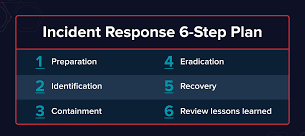

 Steel Cyber Security